Sovol SV08 Max Review
More than the smaller Ender-5 Max; enclosure costs extra.
Our verdict
I’d choose the SV08 Max for wide props and prototype housings that would otherwise need joining. Its 500 mm square print area is the attraction; assembly, tuning and a permanent workspace are the tradeoffs. I would avoid it as an easy first printer or for enclosed jobs needing more than 450 mm of upright height.
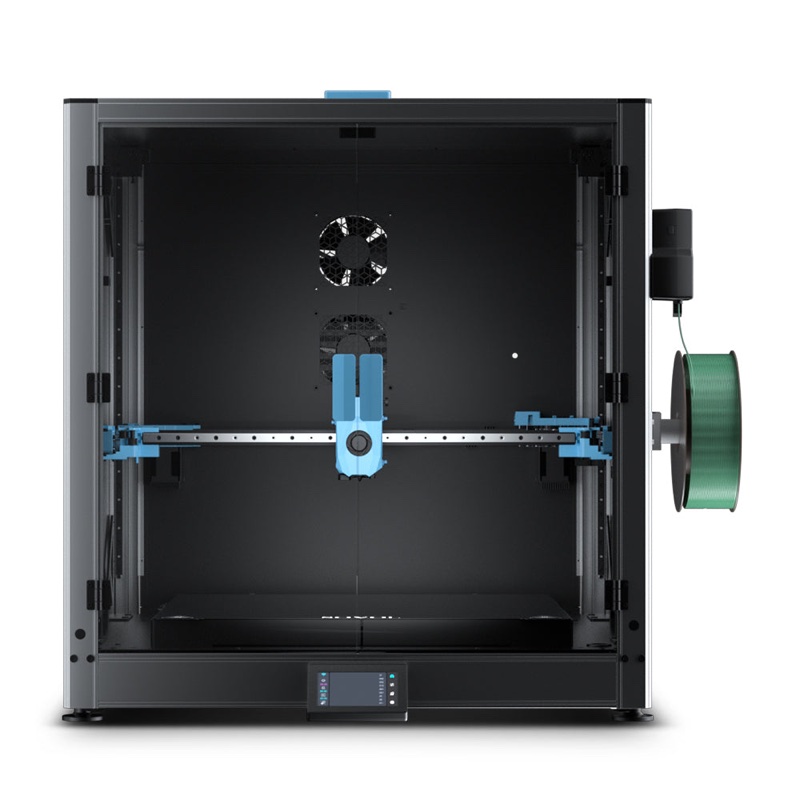
Best atLarge one-piece props and housings for someone comfortable adjusting printer settings.
Less suited toAn easy first-printer experience, tight workspaces or enclosed prints taller than 450 mm.
The Key Specs
| Open print area | 500 × 500 × 500 mmCheck the whole model in the slicer, including supports and any brim. |
|---|---|
| Enclosed print area | 500 × 500 × 450 mmThe optional enclosure gives up 50 mm of upright height. |
| Printer size | 700 × 710 × 750 mm, excluding spool holderAllow extra access for filament, cables, the plate and rear maintenance. |
| First-layer setup | Automatic bed scanningYou may still need to adjust the nozzle’s starting height and filament settings. |
| Material starting point | PLA and PETG in the open configurationLarge ABS or ASA work adds enclosure and ventilation costs; chamber heat may also be needed. |
Which Version Should You Buy?
- Open printer
- I’d start here for ordinary PLA props and PETG parts: lower cost and the full 500 mm height.
- Printer with optional enclosure
- Choose this for large ABS or ASA work, allowing for the 450 mm height limit. Treat a chamber heater and ventilation as separate budget items.
Budget beyond the printer. Allow for filament for long jobs, ventilation and drying equipment if your material needs it. Large ABS or ASA work also needs an enclosure and may need a separate chamber heater. Abrasive blends need a suitable wear-resistant nozzle.
More Specs And Ownership Details
| Nozzle / bed limits | Manufacturer-stated maximums: 300°C nozzle and 100°C bed. Match the exact filament’s requirements. |
|---|---|
| Software | Klipper with Sovol OrcaSlicer profiles; check material settings because Sovol’s presets use its own filaments. |
| Assembly | Supplied in major sections. Allow time for assembly and initial adjustments; the enclosure adds hardware. |
| Filament feeding | An auxiliary feeder assists loading and detects feed problems. Check filament quantity before long jobs and extrusion after refilling. |
| Maintenance | Keep the print plate clean and check the filament tube and feeder for debris or obstructions. |
| Advertised speed / flow | Up to 700 mm/s movement and 50 mm³/s flow; neither is a prediction of a finished part’s printing time. |
I’d consider the Sovol SV08 Max if you regularly print things that won’t fit on a smaller printer: wide props, prototype housings or costume pieces you’d otherwise have to print in smaller parts and put together. Its biggest attraction is the 500 mm square printing area. Its biggest drawback is the work and space you need to use it well.
I recommend it for someone who needs that width and is comfortable adjusting printer settings. If you’re buying your first printer and want an easy start, I’d look elsewhere. Reported tests show that good large prints are possible, but you may need to adjust settings even after automatic setup.
Will Your Parts And The SV08 Max Fit?
The advertised printing space is 500 × 500 × 500 mm without an enclosure, or roughly 19.7 inches in each direction. Add Sovol’s enclosure and the height falls to 450 mm, about 17.7 inches. A model that needs the full open-frame height won’t fit upright in the standard enclosed configuration.
Before buying, open your actual model in OrcaSlicer, the program that turns a 3D design into printing instructions. Select the Max’s profile—its saved printer settings—and position the model as you plan to print it. Leave room for supports, which hold up overhanging sections during printing, and, if needed, a brim: an extra border around the bottom that helps the part stick. A part measuring exactly 500 mm across leaves no room for that border.
You may be able to angle a long, narrow part across the bed, the surface the printer builds on. That doesn’t mean a broad object with the same length will fit. Check the whole shape, including supports, rather than its longest measurement alone.
The printer itself measures 700 × 710 × 750 mm, excluding the spool holder—about 27.6 × 28 × 29.5 inches. You’ll need more space than that to use it. Allow access to the spool of filament—the plastic fed into the printer—plus the cables, doors and removable print plate. Leave room to reach the back for maintenance, too. Measure the route into the room before assembly and choose a sturdy surface where the printer can stay. Squeezing it into a corner makes repairs harder.
How Well Does The Max Print Large Parts?
A reported test filled the bed with a coiled dragon with movable joints, printed in Bambu Lab translucent PETG filament. At 0.2 mm layers and a 100 mm/s speed limit, it took 56 hours, 17 minutes. Success followed five failed attempts, a 0.2 mm increase in nozzle height and a 20-minute warm-up to let temperatures settle. The finished result was reported as excellent.
The nozzle needs to start at the right distance from the printing surface. Too close, and it can scrape through plastic instead of laying it down neatly. The Z-offset setting adjusts that starting distance. Automatic bed scanning measures how the surface height varies, but you may still need to adjust the Z-offset, as this test showed.
A reported 450 mm-tall end table in Prusament Galaxy Black PLA took 61 hours at 0.28 mm layers and an average 140 mm/s. Its finish was good, but it cracked as it cooled during an overnight pause after the filament ran out. The printer was listed with a standard 0.4 mm nozzle; the nozzle wasn’t confirmed for each job. Neither test shows whether the Max repeatedly prints parts to the correct measurements across the whole printing area.
Other reported SV08 Max testing found rougher surfaces, supports that were hard to remove and trouble feeding filament with larger nozzles at demanding settings. Differences in materials and settings may help explain the mixed results. Good quality is possible after adjustment, but you can’t count on getting it with every set of supplied settings.
Sovol advertises printhead movement up to 700 mm/s and plastic flow through the nozzle up to 50 mm³/s. Neither tells you how soon your part will finish. The printer has to slow for some details, let plastic cool and stay within what the filament and heated nozzle can handle. Thick layers demand more plastic per second, so doubling the nozzle size won’t necessarily cut the printing time in half.
For a prop you’ll sand and paint, some surface cleanup may be acceptable. For a housing with holes that must line up precisely, print and measure a small section first. A good-looking large model isn’t proof that your parts will fit together.
Getting The Max Ready And Keeping It Running
Plan for assembly and a first round of adjustments before starting an important job. The printer comes in major sections, and the enclosure adds more hardware. Reported difficulties include dealing with the restraints that secure it for shipping and figuring out where cables should go. Leave time to follow the assembly guide carefully; don’t plan on a quick setup before a deadline.
The Max runs Klipper, software that controls the printer and lets you change its settings. Sovol provides OrcaSlicer profiles and setup resources. Start with the exact Max profile, then check the filament settings: Sovol says its presets are based on its own filaments. Another brand may need different settings even when the material name matches.
Check Sovol’s guidance on updating the Max’s control software, or firmware. Its published update log includes changes to automatic adjustments for the first layer, calibration and heating inside the enclosure. Those changes don’t prove that every earlier printing problem has disappeared. With an enclosure fitted, check that both the printer and OrcaSlicer are set to the 450 mm height limit.
The auxiliary feeder helps push filament along the tube to the printhead and detects feed problems. Use a short print to learn how to load filament and resume printing after a feed problem. Before a long job, check how much filament it needs, and after a refill, confirm plastic is coming out of the nozzle before continuing.
For maintenance, keep the print plate clean and check the filament tube and feeder for debris or anything preventing filament from moving freely. Sovol lists replacement parts for heating and feeding the plastic, as well as beds. Its help center states a one-year printer warranty, shorter coverage for some components, and restrictions on third-party modifications. Check those terms before planning upgrades, even though Sovol makes the printer’s design files available.
What The Max Needs For Your Filament
For ordinary PLA props and PETG parts, the open configuration is the sensible starting point. You keep the full height and avoid paying for an enclosure you may not need. If you buy the enclosure for other materials, don’t assume closing everything up helps PLA: excessive trapped heat caused clogs in reported Max testing.
Large parts made from ABS or ASA plastics need more protection from drafts and uneven cooling, so budget for the enclosure. These plastics can shrink enough during printing to lift corners or split layers. Reported results include a well-fitting PolyLite ABS container printed at 0.2 mm layers and an average 140 mm/s in 5 hours, 6 minutes. Other enclosed-Max testing reported ABS warping and layers splitting apart when the enclosure wasn’t warm enough. A successful container doesn’t establish success with a panel as wide as the bed.
Sovol lists a separate SV08 Max chamber-heating module, a heater for the enclosed space, with a US shipping option. Don’t assume it’s included with the enclosure. The published firmware log caps the chamber setting at 60°C; that doesn’t show whether the entire enclosure reaches the same temperature.
The printer’s stated limits remain 300°C at the nozzle and 100°C at the bed. Check the requirements of the exact nylon, polycarbonate or fiber-filled filament you want to use. Sovol sells compatible hardened-steel nozzles for blends that wear down nozzles, but a suitable nozzle alone doesn’t establish that a demanding material will print well at this size.
Also plan ventilation that captures and removes printing emissions. Glass panels retain warmth; they don’t establish safe air quality. Follow the heater’s installation instructions, including switching the printer off before connecting its wiring.
Is The Max Worth The Space And Expense?
The Max’s extra width is worth paying for if it saves you work. Printing a large prop in one piece can save assembly and finishing time. A prototype housing that fits can spare you from designing joints just to print it on a smaller printer.
For large ABS or ASA work, include the enclosure, any needed chamber heater and ventilation in your budget. Add filament drying equipment if your chosen material requires it. Compare the cost of everything your material needs, rather than the printer alone.
If your parts fit inside 400 × 400 × 400 mm, consider the cheaper open-frame Creality Ender-5 Max. It offers less printing space, though it’s still too large to call a compact desk printer. The lower cost doesn’t tell you whether it will finish the same job faster or more reliably.
I’d skip the Sovol if you want an easy first printer, can’t leave room to reach it for maintenance, or need more than 450 mm of upright height while enclosed. Buy it if you need its width and are prepared to adjust settings and check on long prints.


